


Hey folks!
In a previous post, I talked about selling pickaxes during the AI gold rush — why terminal infrastructure compounds quietly while flashy applications grab headlines.
A few people asked me to go deeper on one specific claim: That bundling CLI tools like fd, ripgrep, and fzf is a meaningful feature, not a gimmick.
Fair question. Let me answer it by walking through every tool YEN ships, why each one exists, and why the bundle as a whole is the product.
The Problem With “Just Install It”
Here is a scenario every developer has lived through.
You open a new terminal. You try to search your codebase. Oh wait — you haven’t installed ripgrep yet on this machine. So you brew install ripgrep. Then your file manager plugin wants fd. Then your fuzzy finder needs fzf. Then you realize bat isn’t configured with the right theme, and zoxide doesn’t have your directory history, and the versions are mismatched, and now you’ve spent forty-five minutes on tool setup instead of actual work.
Damn. What a waste.
Multiply that by every machine you touch. Every fresh OS install. Every coworker you try to onboard.
The terminal ecosystem has extraordinary tools. What it has never had is a (hyper-opinionated) curator. Someone who says: These proven power tools work together, they are pre-configured, pre-signed, and ready on first launch. No homebrew. No dotfile archaeology. No version conflicts.
That is what YEN does. And that is a harder problem than it sounds. But, it’s totally worth it because it elevates the user’s abilities while minimizing onboarding time.
That’s a win.
The Present Tool List
Eleven third-party tools ship inside YEN, alongside the terminal engine itself — twelve vendored binaries total, all signed and updated together.
Every tool listed below ships inside the YEN application bundle. Each binary is individually code-signed and notarized by Apple. They are updated together through a single vendor pipeline.
They work on first launch with zero configuration.
Magic.
Yazi — The File Browser
Replaces: ranger, nnn, lf
Written in: Rust (Tokio async runtime)
What makes a file manager “modern” is not aesthetics — it is whether the UI freezes when you open a directory with twenty thousand files. Ranger is single-threaded Python. It chokes. nnn is fast but minimal — no preview, no plugins, no image support. lf is Go and reasonably quick, but its ecosystem is thin.
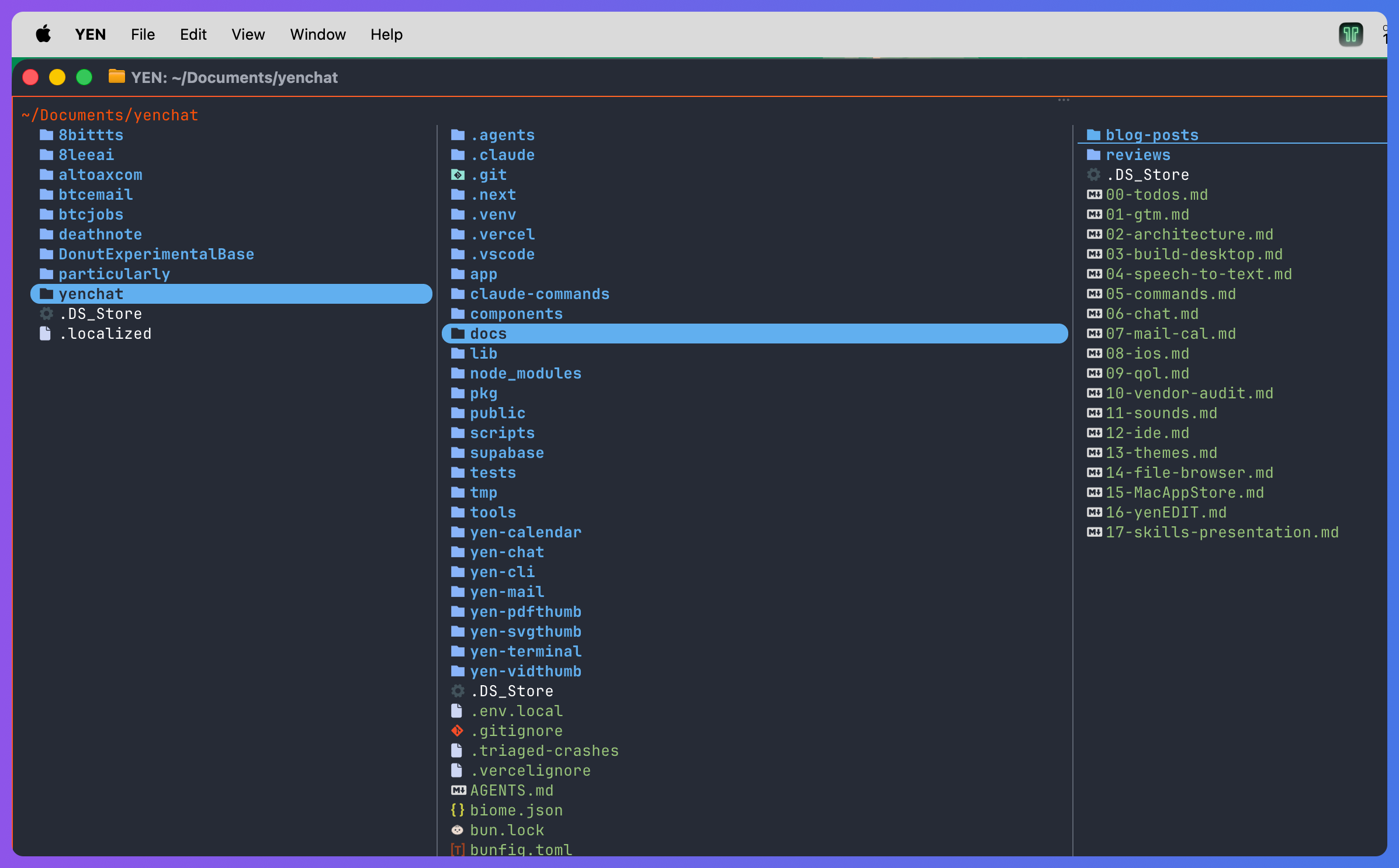
Yazi runs directory reads, thumbnail generation, and file operations on separate async tasks. You navigate a directory with ten thousand entries and the cursor moves instantly because rendering never waits on I/O.
It supports image preview via terminal graphics protocols, has a Lua plugin system, and — critically — it delegates to specialized tools for specific tasks instead of reimplementing everything badly.
This is why Yazi is the orchestrator. It calls fd for search, ripgrep for content grep, fzf for fuzzy selection, bat for syntax-highlighted preview, zoxide for directory jumping, and jq for JSON parsing. Each tool does one thing well. Yazi composes them into a cohesive experience.
In YEN, you hit Cmd + Shift + O (or just type “y” off the shell) and you are in a file browser that took zero seconds to configure. Git status indicators, syntax-colored previews, cd-on-quit. Forty-five lines of Swift integration replaced 850 lines of custom file-browser UI we prototyped and threw away.
fd — The File Finder
Replaces: find
Written in: Rust
If you have ever typed find . -name “*.ts” -not -path “*/node_modules/*” and thought “this is absurd,” well, then fd exists for you.
fd respects .gitignore by default. It parallelizes directory traversal across CPU cores using the ignore crate — the same one ripgrep uses. It has smart case matching. It uses regex. On a large repository, fd finishes a file search five to ten times faster than find because find walks the tree single-threaded and searches everything — including the 200 MB of node_modules you never wanted to look at.
In YEN, Yazi delegates all file search to fd. When you type a query in the file browser, results appear instantly. That speed comes from fd, not from Yazi being clever about I/O. The right tool for the job.
ripgrep — The Content Search
Replaces: grep, ag (Silver Searcher), ack
Written in: Rust (by Andrew Gallant, aka BurntSushi)
ripgrep is one of the most important command-line tools written in the last decade. It uses a finite automata-based regex engine that avoids catastrophic backtracking — a class of bug where a pathological regex pattern causes grep to hang for minutes. ripgrep cannot hang. The algorithm guarantees linear-time matching.
It also respects .gitignore, searches files in parallel, skips binary files automatically, and handles Unicode correctly. On benchmarks against grep, Silver Searcher, and ack, ripgrep wins on every workload and it is not close.
In YEN, ripgrep powers content search in the file browser. The difference between ripgrep and grep is the difference between “search is instant” and “search is tolerable.” When you are navigating a codebase, that gap changes your behavior — you search more, you explore more, you find things faster.
fzf — The Fuzzy Finder
Replaces: nothing (created the category)
Written in: Go
fzf invented interactive fuzzy finding for the command line. There was no predecessor because nobody had built a real-time, interactive filter that works as a Unix pipe. You feed it a list — file names, grep results, git branches, shell history, anything — and it renders a TUI where you type characters and the list narrows in real time.
The matching algorithm is a modified Smith-Waterman — borrowed from bioinformatics sequence alignment — tuned for human typing patterns. Go was the right language choice because goroutines handle the concurrency model cleanly. Readers, matchers, and renderers run in parallel, so typing never blocks even on a million-line input.
In YEN, fzf is the glue between tools. Yazi pipes fd results through fzf for interactive file picking. The experience is: you hit a key, you start typing, the entire codebase narrows in real time. No configuration. No key binding setup. It works because the tools were designed to compose.
zoxide — The Directory Jumper
Replaces: cd, autojump, z, fasd
Written in: Rust (SQLite backend)
Every developer has a handful of directories they visit constantly. Typing out a full path six directories deep is not a reasonable thing to do every day. Classic solutions like autojump and z were shell scripts backed by text-file databases that degraded over time and broke on concurrent access.
zoxide uses a “frecency” algorithm — frequency multiplied by recency — stored in SQLite. You visit a directory, it records it. Next time you type z settings and it jumps to the right place. SQLite handles concurrent access correctly, which matters when you have multiple terminal tabs.
In YEN, zoxide powers quick directory jumping inside the file browser. The directories you visit most frequently rise to the top. Your muscle memory from shell z shortcuts carries directly into the file browser.
bat — The File Viewer
Replaces: cat
Written in: Rust (syntect library, Sublime Text grammars)
bat is what cat should have been. Automatic syntax highlighting for over 200 languages. Git diff markers in the gutter. Line numbers. Paging. Themes.
The key technical detail: bat uses the syntect library, which loads Sublime Text grammar files. These are the same grammars used by VS Code and Sublime Text — battle-tested, comprehensive, accurate. When bat highlights your Python file, it is using the same parser rules as your editor.
In YEN, bat serves double duty. The file browser’s pane preview uses bat for syntax coloring. When you press Enter for full-file view, it opens the same file with the same bat theme. Preview and full view never drift because they use the same rendering engine. The theme is bundled and configured at build time. One thing that just works.
jq — The JSON Processor
Replaces: nothing at this level of capability
Written in: C (custom parser, bytecode VM)
jq is the oldest tool in the bundle and the least “modern” by the Rust-wave definition — it shipped in 2012. But it remains the undisputed standard for command-line JSON processing because nobody has built anything better.
jq has its own query language. You can filter, transform, map, reduce, and restructure JSON with expressions that would take twenty lines of Python. The C implementation compiles to a tiny binary and executes instantly.
In YEN, Yazi’s plugins use jq to parse JSON metadata — file info, archive contents, git status. It is the one-megabyte binary that eliminates the need for embedding a full scripting runtime just to read a config file.
lazygit — The Git UI
Replaces: memorizing git rebase -i, git add -p, git stash
Written in: Go (gocui TUI library)
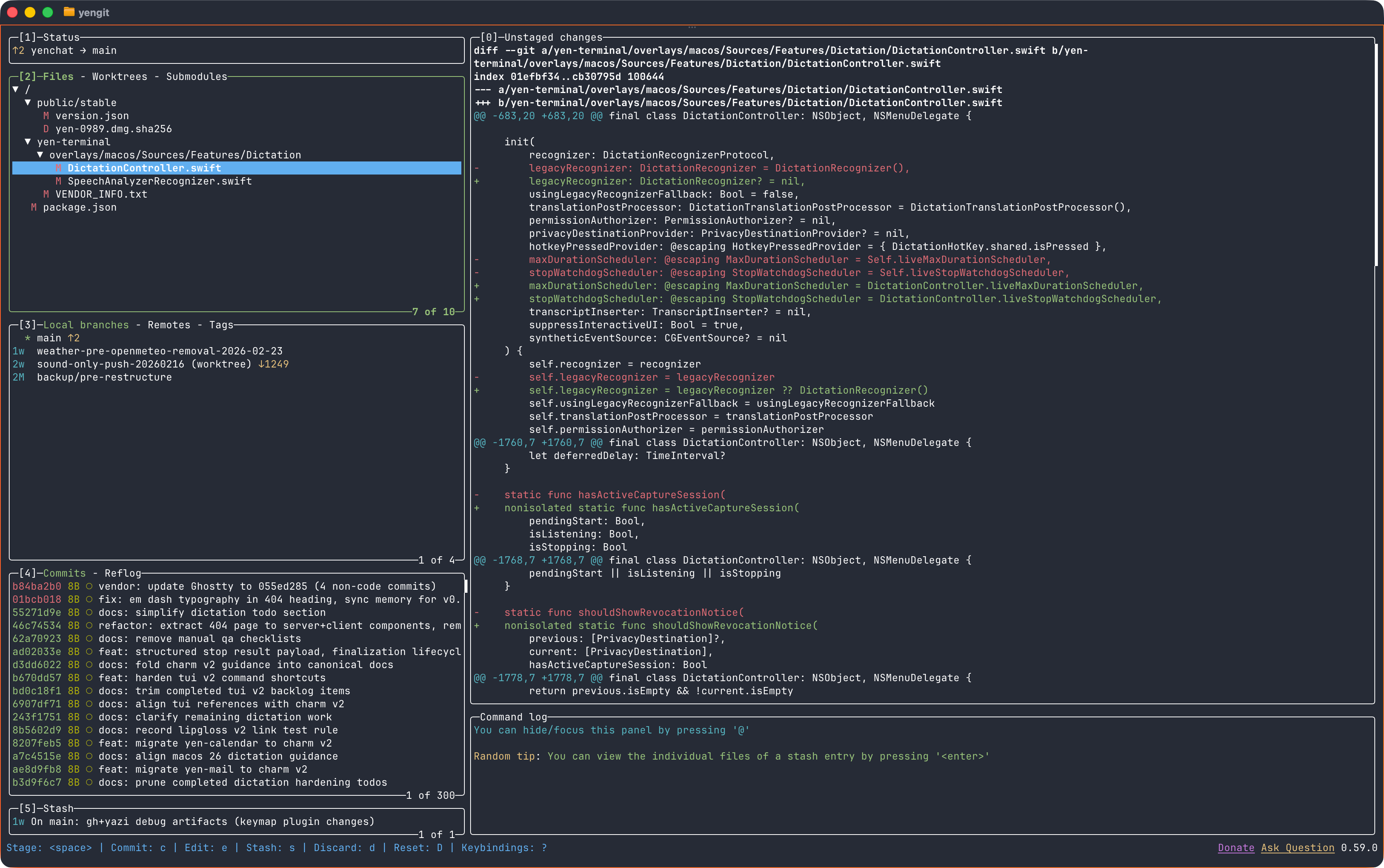
There are two kinds of developers: those who are fluent in interactive rebase, and those who are honest about it. lazygit gives the second group — and the first, when they are tired — a visual interface for staging hunks, resolving conflicts, managing branches, stashing, cherry-picking, and rebasing. All keyboard-driven in a TUI.
Go’s goroutine model means git operations run asynchronously without freezing the UI. You can stage a hunk and the diff updates in real time while git is still writing.
In YEN, lazygit is accessible via the lazygit command. It is a full visual git client that never leaves the terminal. The kind of tool that makes people stop reaching for a GUI app.
resvg — The SVG Renderer
Replaces: librsvg, ImageMagick SVG path, Inkscape CLI
Written in: Rust (tiny-skia, a Skia subset in pure Rust)
SVG rendering sounds simple until you try to do it without pulling in the entire GNOME graphics stack. librsvg depends on Cairo, Pango, and GLib. ImageMagick’s SVG support is inconsistent. Inkscape is a 200 MB desktop application.
resvg achieves strict SVG spec compliance — it passes the SVG test suite better than most browsers — in a statically-linked binary with zero system dependencies. It does this by implementing its own 2D rendering engine in pure Rust, avoiding the transitive dependency nightmare entirely.
In YEN, resvg is the fallback for SVG thumbnail generation. The primary path uses macOS native APIs, which handles most cases. resvg catches the edge cases where the native renderer diverges from spec. Native first, vendor for the gap.
btop — The System Monitor & fastfetch — The System Info
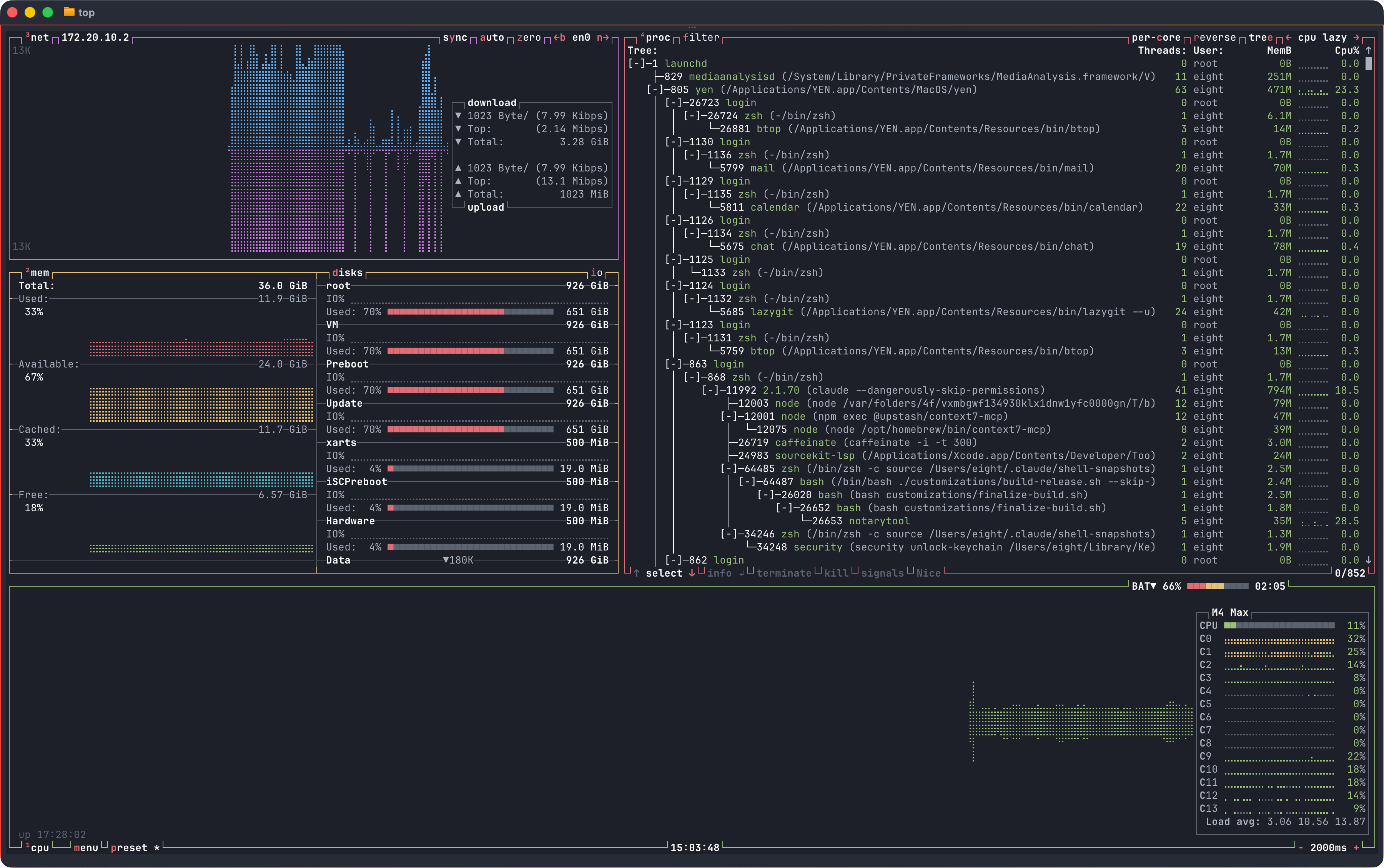
btop (C++) is a full-dashboard system monitor — CPU, memory, disk, network, GPU, all on one screen with real-time graphs. We compile it from source because upstream does not publish macOS universal binaries. fastfetch (C) is the spiritual successor to neofetch — instant system info in fifty milliseconds instead of three seconds, using native macOS APIs instead of shell subprocess spawning.

Together they close the gap between “tools for your code” and “tools for your machine.” We wrote a dedicated post about both with the full technical story — why btop requires a source build, how fastfetch replaced neofetch’s architecture, and the vendor pipeline details.
The Bundle Is the Product
Here is the part that matters more than any individual tool.
A terminal that ships fd, ripgrep, fzf, zoxide, bat, jq, lazygit, resvg, btop, and fastfetch alongside a Rust file browser is not just a terminal with some extra binaries. It is an integrated environment where the tools are pre-configured to work together.
The Neovim problem, solved differently.
Power users who build terminal-native development environments from scratch assemble roughly this same stack. Neovim plus telescope plus treesitter plus fzf plus ripgrep plus lazygit — the tools are almost identical.
The difference is the setup cost. A productive Neovim configuration takes hours to days. Plugin conflicts are common. Version mismatches break things. Upgrades require debugging Lua.
YEN ships the same capabilities with zero configuration. Not because the tools are simpler — they are the exact same tools. Because the configuration is done once, at build time, and tested together before it ships.
The IDE problem, inverted.
Most IDEs are text editors that bolted on a terminal panel. The terminal is an afterthought — a small rectangle at the bottom of the screen where the AI features stop working. Type a shell command in Cursor and the AI context evaporates.
YEN takes the opposite approach. Start with the fastest terminal on macOS — a GPU-accelerated Zig/Metal engine rendering at 60 FPS with sub-millisecond input latency — and add IDE capabilities directly inside it. The file browser, the git client, the search tools — they all render where your cursor already is. Over SSH, they work identically. AI coding tools like Claude Code already run in the terminal. YEN gives them the best possible runtime.
Every binary is signed.
This matters more than developers realize. macOS code signing and notarization require every embedded Mach-O binary to be individually signed.
YEN’s build pipeline signs all eleven tools (plus the terminal engine — twelve vendored binaries total), verifies entitlements, and notarizes the bundle as a unit. If you download these tools separately via homebrew, they are unsigned. Gatekeeper will warn you. Some enterprise machines will block them entirely.
One update command.
When ripgrep ships a new version, it flows into YEN through a single vendor update pipeline. All twelve vendored binaries are checked, downloaded, baseline-tracked, signed, and shipped together. No dependency hell. No “which version do I have” debugging.
Nine of the eleven tools are written in Rust or C/C++ — compiled to native code, zero runtime overhead, statically linkable. The two Go binaries (fzf and lazygit) are still single-binary with no transitive dependencies. Every tool in the bundle was chosen because it does exactly one thing, does it better than the alternatives, composes with Unix pipes, and ships as a single binary. That pattern is the design decision.
The terminal has survived every platform shift for sixty years — teletypes, minicomputers, PCs, the web, mobile, cloud, and now AI. It survived because the interface contract is simple and the composability is real.
YEN’s bet is that curating the best terminal tools, signing them, testing them together, and shipping them as a single app is more valuable than any one feature.
If you start from first principles — what does a developer actually need every single day — you end up with a fast terminal, a good file browser, instant search, fuzzy finding, smart navigation, syntax preview, a git client, and system monitoring.
Not as separate homebrew packages you configure yourself. As a thing that works when you open it.
That is the toolbox under the hood. And it keeps getting better and better.
— 8