


Hey folks!
I use Git all day, but most Git UI still makes me switch modes. And that annoys me a bit because I don’t like things that are slow or that require me to lose context and focus on my present work.
You see, sometimes I want the full thing fast: Staging hunks, rewriting history, checking branches, reviewing commits, handling stash state. For that, YEN already bundles lazygit. And yes, it’s mature, fast, and good enough that rebuilding it from scratch would be a waste.
But there is another Git moment that happens constantly: I just want to know what changed in the split I am already looking at.
That is what the new native Git drawer is for.
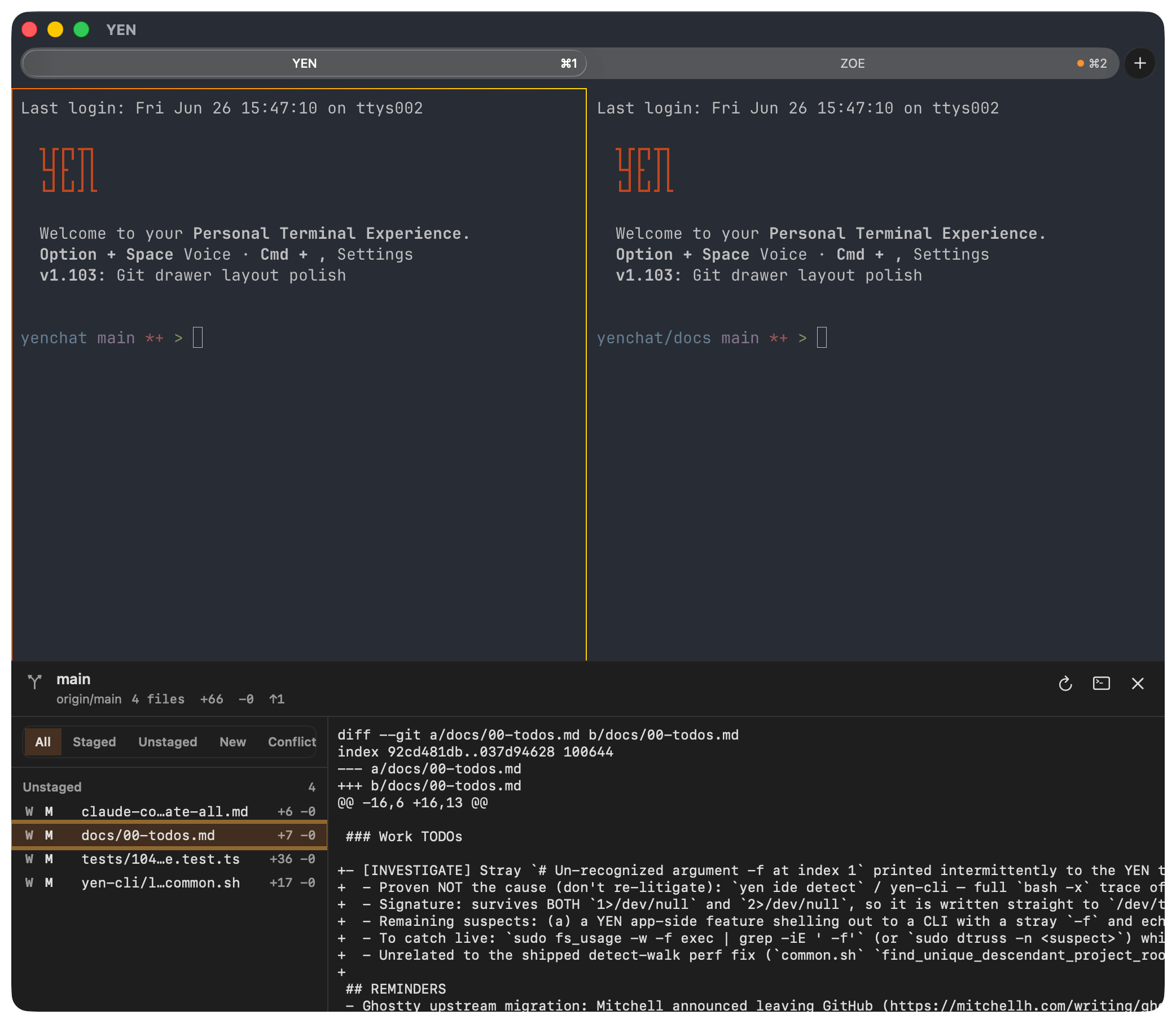
It really is that simple. And useful. And unobtrusive.
It ships in YEN v1.095 as a read-only macOS drawer on Cmd + Shift + G. It opens from the bottom of the active terminal window, looks at the focused split, resolves the local Git working tree, and shows the raw local changes without launching a new shell.
Why I Built It
YEN is becoming a terminal-first IDE, but I do not want every feature to become a second-rate clone of a mature developer tool.
The rule I keep coming back to is simple: vendor what is already excellent, build native surfaces where the terminal/window context makes the workflow better.
Git is a perfect example.
lazygit is the right answer when I want to operate on a repository. It is the full TUI. It can stage, commit, stash, branch, rebase, and move around a repo with intent.
The Git drawer is not trying to replace that.
The drawer is the glance path. It answers:
What branch is this split on?
Is this worktree clean?
What files changed?
Which changes are staged, unstaged, untracked, or conflicted?
What does the raw diff look like?
Can I copy the path, copy the diff, open the file, or jump into lazygit if this needs a real Git operation?
That is a different job than a Git TUI, so it deserves a different shape.
How It Works
Simple. When you press Cmd + Shift + G, YEN opens an attached bottom drawer inside the current terminal window.
It does not create a Quick Terminal. It does not paste a command. It does not spawn an interactive shell. It uses the focused terminal split’s trusted working directory, resolves the repository root, and asks Git for structured read-only data.
The first version shows:
Branch name.
Upstream tracking ref.
Ahead and behind counts.
Clean or dirty summary.
Total changed-file count.
Repo-wide additions and deletions.
Read-only stash count.
Grouped file changes for staged, unstaged, untracked, and conflicted files.
Per-file status badges such as M, A, D, R, U, and ??.
Per-file additions and deletions, with honest placeholders for binary and submodule rows.
Raw unified diff for the selected file.
You know, the basics.
The default renderer is intentionally plain. I did not route this through delta for v1 because I wanted the drawer to prove the raw Git path first. Pretty diff rendering can come later. The baseline should be correct before it is decorative.
Read-Only On Purpose
The drawer does not stage files. It does not unstage files. It does not commit. It does not apply stash state. It does not revert files.
And all of that is deliberate.
The feature is meant to be safe to open while cycling through terminal splits. If I am jumping between server, client, tests, docs, and a scratch repo, I want Cmd + Shift + G to be a fast inspection surface, not a place where an accidental keypress mutates history.
When I need to do Git work, the drawer has a handoff button to open the current repo in bundled lazygit. That keeps the roles clean: native drawer for context, TUI for operations.
Failure States Matter
One of the easiest ways for a developer tool to feel sloppy is to confuse “nothing changed” with “I could not read anything.”
So the drawer now has explicit notices for the failure modes I care about:
No Git repository here.
Bare repositories are not supported.
Git is not available at /usr/bin/git.
Git is taking too long.
Unable to read this worktree.
Read-only drawer blocked a mutating command.
Unable to open Git drawer.
The no-repository case tells you to open a split inside a Git checkout or run git init. Bare repositories point you toward a working-tree checkout. Missing Git points at /usr/bin/git. Timeout and command-failure states suggest refresh, lazygit, permissions, hooks, or Git config depending on what happened.
A clean repository is different. A clean repo still gets the full header and says the working tree is clean. That distinction matters because “clean” is a successful state, not an empty fallback.
Why This Belongs in the Terminal (and YEN)
Most terminals know almost nothing about the work happening inside them.
YEN already has more context: Splits, tabs, trusted working directories, window ownership, local IDE commands, file browser state, PR review surfaces, merge-conflict surfaces, bundled tools, and macOS-native panels.
That makes a native Git drawer useful in a way a generic app-level Git sidebar is not.
The feature is small, but the context is the point. And it’s clearly very intentional. The terminal already knows which split I am working in. The Git UI should use that knowledge.
Now, I could follow-on with hunk navigation, copy, diff rendering, but, I’ll leave those until I actually find myself wanting them badly.
This narrow implementation gets me precisely where I want to go. I hope you find it useful too! I want the read-only foundation to be boringly reliable first: Open the drawer, see the local truth, copy or open what you need, and keep moving.
That is the kind of terminal-first IDE feature I want YEN to have more of. Not a giant replacement for every tool you already trust. A small native surface that removes one more context switch.
Simple. Elegant. Useful.
— 8