
YEN 1.283 added two experiments that started as separate apps. The token counter comes from JPtheCat, the menu bar cat that watches what your agents spend. Moving Wallpaper comes from MovingPaper. Both stay off until you turn them on in Settings.
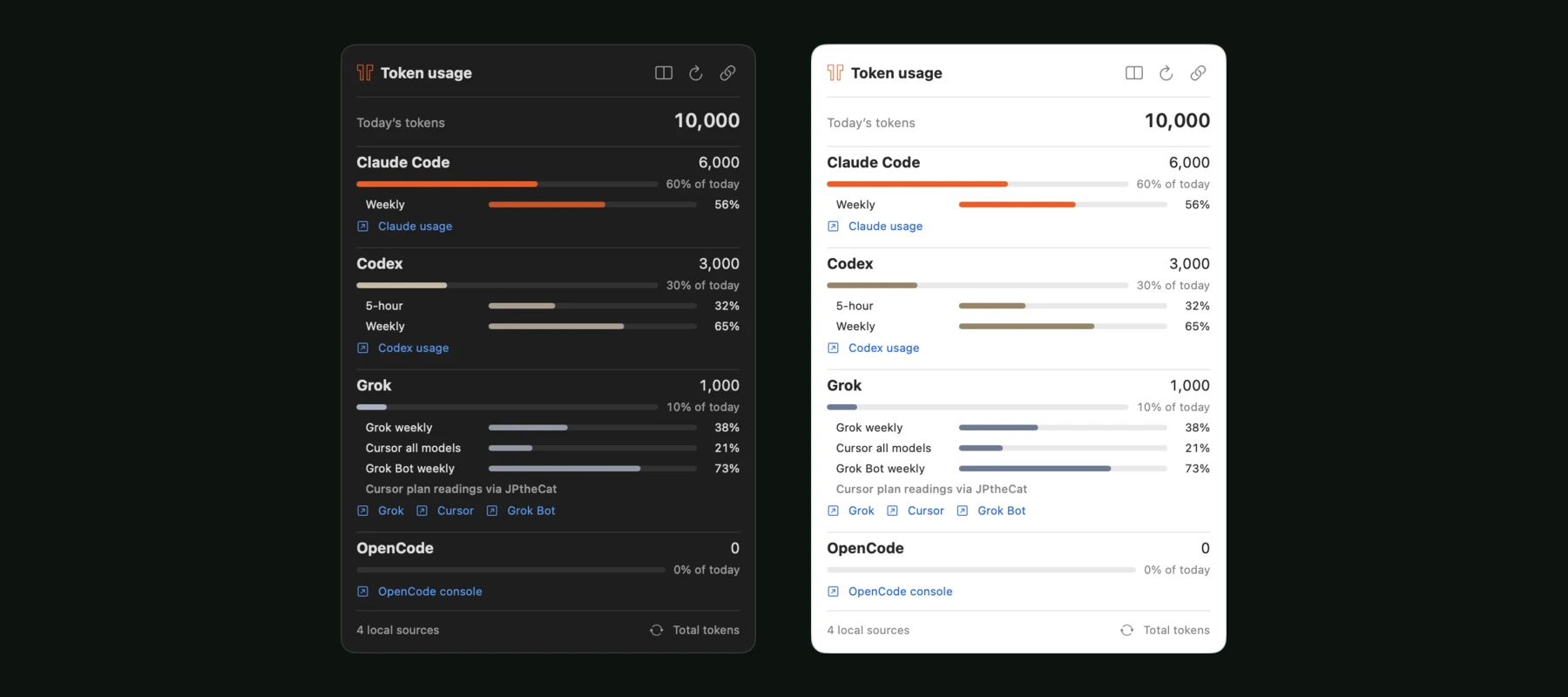
In 1.285, the token menu shows everything at once. Each tool lists its exact count for the day and its share of the total. The plan bars sit right below: a weekly window for Claude, 5-hour and weekly windows for Codex, and up to three pools under Grok. You no longer expand a row to read a number.
A plan bar appears when the tool has recorded a current reading on your Mac. Cursor and Grok Bot need one more step. Click the link button and add a personal Cursor API key, which YEN keeps in your Keychain. If JPtheCat already reads those plans, YEN shows its readings and labels them.
Two buttons change how much you see. The layout button switches between one column and two. The button in the footer cycles the menu bar through the day’s total, the busiest tool, your plan limits in rotation, and the icon alone. Each tool links to its official usage page. The panel follows your terminal theme, so a light theme opens a light panel.
The counts still come from records that Claude Code, Codex, Grok Build and OpenCode write on your Mac, including work you did outside YEN. None of it goes to YEN’s servers.
Moving Wallpaper lives under General, then Experimental. Pick a video, a GIF, a YouTube link or a clip from Photos, and YEN plays it behind your desktop icons. It starts muted. Each desktop can have its own selection. Turn it off and your own wallpaper is back.
To try the counter, open Settings, then General, then Menu Bar, and turn on Show Token Usage. The manual explains how each tool counts.