


A big thank you to Codex SF for hosting an event that inspired this long sermon on agent harnesses, to George for allowing me to speak, to Andrew and George setting the tone, and to Angela who was the first to ask for my presentation!
I didn’t actually have one since my presentation were simply notes viewed via my Terminal but my passion for education got the better of me and I was inspired to actually sit down and write it all out.
Whew. So, with that, here we go.
TL;DR: Skills and Harness Engineering is Technical GodMode™
I ship a signed, notarized, cryptographically verified macOS desktop app — touching 30 distinct languages, 5 compilers, 65 verification checks, and zero CI servers — from a single command on my laptop.
Yeah, it sounds pretty badass. It is.
That’s because I have a release pipeline that is orchestrated by an AI agent constrained by a bespoke harness I designed. It takes about ~15 minutes.
It used to take days.
This post is a little bit of a story of how I got here, what I built, why it works, and — most importantly — how you can apply these patterns to your own projects.
Every technique described here is production-tested. Every number is real. Every lesson was earned the hard way.
And the timing is perfect because the version currently sits as v.990 — almost to our v1.0 release! But the proof is in the pudding: I’ve compiled and shipped this product almost 1,000 times and it just works.
Every single time with 100% confidence and zero worry.
But they told me that I couldn’t “manage AI” and that it would be dangerous!
Wrong.
Table of Contents
Why This Matters
The System at a Glance
The Arc of Build Automation
What Makes a Good Harness — 3 Pillars
Build a Useful Skill Taxonomy
Polyglot Challenge — 30 Languages, One Pipeline
Codex-Native Skills — Progressive Disclosure and Machine-Evaluable Evals
Reproducible Patterns You Can Copy
In Conclusion
0. Why This Matters
It matters because this is about not just automation or efficiency; it’s about time.
Time is all we’ve got and it just doesn’t make much sense sitting in the old paradigm, waiting around for hours as you do things manually when you can do them in minutes (or even faster).
So, I want to save as much as I can so I can do other things.
And I’d like that for everyone else too. I hope this post helps. You see, the answer is really pretty simple. The answer is a system — not a trick, not a framework someone else built, and certainly not a SaaS product that I had to sign-up for.
Instead, it’s just a system I designed and iterated on across nearly 1,000 releases, grounded in harness engineering best practices from OpenAI’s Codex team, pressure-tested against the most fragile operations in software (code signing, notarization, cross-compilation, cryptographic verification), and running in production right now.
YEN is macOS desktop app. More specifically, it’s a modern Terminal-first IDE built on top of libghostty’s C library, bundling 12 third-party CLI tools, 3 native Swift helpers, 3 Go TUI applications that integrate with Google OAuth, the Gmail API, and the Google Calendar API, custom notification sounds with their own EdDSA-signed versioning system, and 23,000 lines of hand-crafted Swift overlay code.
The service stack spans Supabase (PostgreSQL + RLS + Storage), Vercel (Next.js 16 on Turbopack with edge deployment), Cloudflare (DNS routing + email forwarding), Sparkle (macOS auto-update framework with EdDSA cryptographic signing), and Apple’s notarization and timestamp infrastructure. The project spans 30 distinct languages and formats.
The command that starts and ends it all? One word. Easy mode:
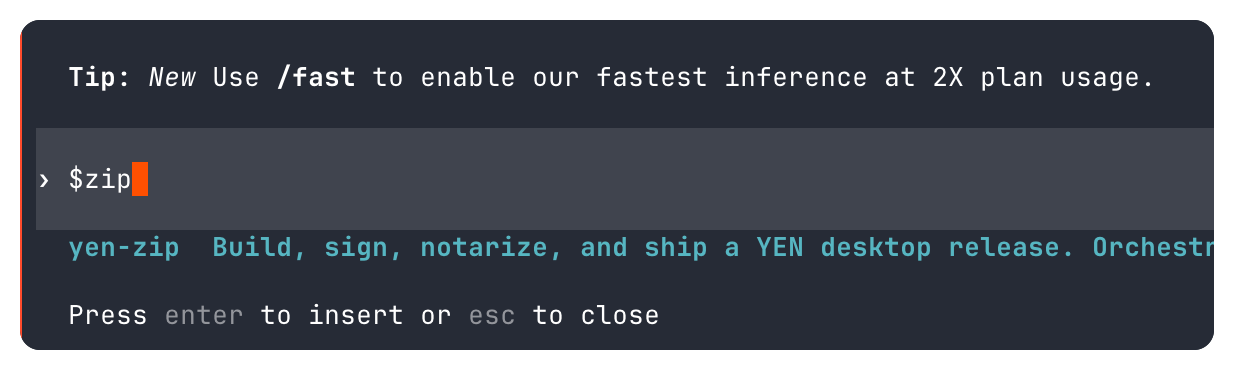
$zip And that one 3-letter word kicks off a pipeline that reads, writes, transforms, compiles, verifies, signs, and bundles artifacts that cascades into calculated triggers for a web deployment to Vercel that updates the public-facing download page, public documentation, API routes, and SEO metadata in a single push.
There is no Jenkins. No GitHub Actions. No BuildKite. No Travis. No Forest. Nothing. And I have spent years learnings each one and agonizing on why they would break so often. Now? My simple MacBook Pro IS the CI.
My machine’s keychain holds the signing identity, notarization credentials, and the Sparkle EdDSA private key. A single command triggers the whole thing. And the AI agent that runs it is constrained by a harness that makes it impossible for it to do the wrong thing in the places that matter most.
The value proposition is simple: I replaced an entire DevOps team and a CI/CD infrastructure with 18 AI-orchestrated skills, 12 shared bash libraries, 7 pre-tool hooks, and a design philosophy that says “enforcement beats instruction.”
If you’re building anything that involves complex multi-step processes — release pipelines, vendor management, cross-compilation, signing workflows — the patterns in this post report will hopefully save you enormous amounts of time.
Not because they’re clever but because they’re simple, they’re mechanical, they’re boringly-predictable, and they just plain work.
1. The System at a Glance
Before we go deep, here’s the 30-second overview:
One command — An AI-executed skill (409 lines of instruction).
12 sequential steps — Pre-flight, vendor gate, version bump, sync, verify, build, post-verify, stage, commit, verify upload, push, summarize.
5 compilers triggered — Zig, Swift, Xcodebuild, Go, swiftc, AppleScript.
30 languages — Swift, Zig, Go, TypeScript, C/Obj-C, Python, Bash, Metal, GLSL, Lua, AppleScript, SQL, JSON, XML, Plist, XIB, pbxproj, TOML, YAML, Gettext, and much, much more.
65 verification checks — 13 pre-build + 44 core + 8 post-build categories.
7 pre-tool hooks — Physical constraints (agent harness) on the AI with a discrete list of blocked commands that should never execute.
Local toolchain — Bun (package manager + test runner), Zig, Xcode / Xcodebuild, Go, swiftc, lipo, hdiutil, codesign, xcrun, iconutil, ImageMagick, sips, git, gh.
External services — Apple (codesign, notarytool, timestamp), Sparkle (EdDSA auto-update), Supabase (PostgreSQL + Storage), Vercel (Next.js edge), Cloudflare (DNS + email forwarding), Google (Gmail API, Calendar API, OAuth2).
Zero CI servers — My notebook computer is the CI. Magic.
~15 minutes — Full clean build to published release (desktop + web + docs + infrastructure).
The output: A versioned, signed (SHA-256), notarized, stapled .DMG file hosted on Supabase, with an updated Sparkle appcast, committed and pushed — ready for users to download.
One command updates the desktop app, the web presence, and the project documentation in a single atomic flow.
It feels like we’re getting 10x or 100x engineering vibes, right?
2. The Arc of Build Automation
Build automation isn’t new. What’s new is who — or what — runs it.
1976 — make — Dependency graphs, file timestamps.
1990s — autotools — Cross-platform configure/ make / install.
2000s — CI/CD — Jenkins, Travis, GitHub Actions, remote machines run the build.
2010s — IaC — Terraform, Docker, infrastructure as code, reproducible envs.
2020s — GitOps — Declarative desired-state, reconciliation loops.
2025+ — AI Skills — The agent reads the runbook and executes it. The harness manages and constrains it while allowing it to move fast (and token count).
Every generation solved the same problem:
How do you make a complex, multi-step process reliable and repeatable?
The answer evolved from dependency graphs (make) to remote execution (CI) to declarative state (GitOps).
And now AI skills are the next step: Imperative runbooks executed by an agent that can read output, make decisions, and handle the unexpected — constrained by a harness that enforces invariants the agent cannot override.
This isn’t “AI writes code.” This is production-grade harness engineering; designing the system so the AI can reliably operate it.
The distinction matters.
I’m not asking the AI to be creative. I’m asking it to follow a precise, gated, fail-closed protocol — and I’m making sure it physically can’t deviate from that protocol in the places where deviation would be catastrophic.
3. What Makes a Good Harness — 3 Pillars
OpenAI’s harness engineering framework identifies three pillars. Here’s how I implement each, with concrete examples you can adapt:
Pillar 1: Context Engineering
The agent can only act on what it can see. So I made the repository the single source of truth for everything.
AGENTS.md — 600+ lines of project rules. Not guidelines, not suggestions — rules. The agent reads this on every invocation and knows exactly how this project works.
version.json — The canonical version. One file. Every other version reference in the project is derived from this file mechanically.
required-app-bins.sh — A binary inventory. Single source of truth for what goes in the app bundle.
privileged-action-surface-baseline.txt — And, of course, the security surface. This is a CLI command routing table + App Intent permission scopes, diffed against on every build that goes through the pipe.
Each skill file IS the context.
This $zip is a 409-line instruction set. The agent reads it and has everything it needs to execute the pipeline. No Confluence page. No Google Doc. No Slack thread from six months ago. If the agent can’t see it in the repo, it doesn’t exist.
Tip: Put your golden principles in the repo, not in documentation systems the agent can’t reach.
I keep seeing teams with build instructions in Notion or wiki pages that the AI agent has no access to.
Your repo IS the documentation.
Your skill files ARE the runbook.
Collapse the distance between “where the instructions live” and “where the agent does it’s work” to absolute zero.
Pillar 2: Golden Principles
Opinionated, mechanical rules encoded in the repo.
Not aspirational. Enforced.
Sorry AI. It’s not gen-AI spaghetti meme time any more. Serious work only.
AGENTS.md enforces things like bash 3.2 compatibility (because macOS ships this ancient tool and it just works), bottom-up code signing (because codesign --deep is a trap — more on that later), overlay-only vendor mods, and version format 0.XXX.
But here’s the critical insight from practice: Golden principles as instructions are good. Golden principles as enforcement hooks are better.
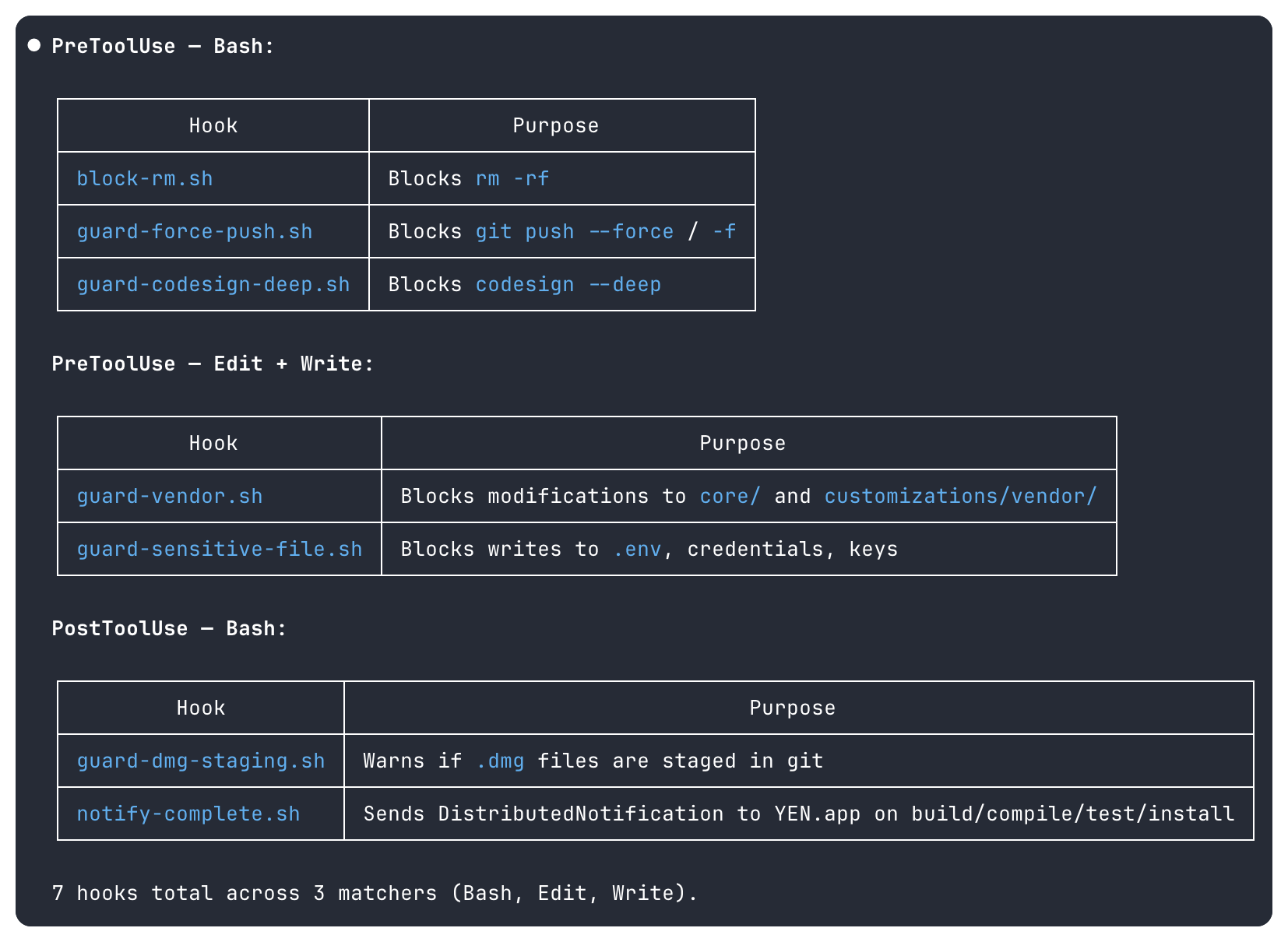
Here’s an example of a pre-tool hooks firing before the tool executes. They’re not instructions the agent might ignore — they’re physical barriers:
block-rm.sh — rm -rf — Prevents catastrophic deletion.
guard-force-push.sh — git push --force — Protects commit history.
guard-codesign-deep.sh — codesign --deep — Forces bottom-up signing discipline.
guard-vendor.sh — Direct edits to core libraries — Enforces surgical edits overlay-only mods.
guard-sensitive-file.sh — .env, .pem, .key credentials — Prevents secret exposure.
You see, the agent doesn’t need to “remember” not to use codesign --deep. It physically can’t. The hook intercepts the command before it executes. The agent never sees it succeed.
That’s a harness and it’s the difference between hope and agentic engineering.
Tip: Identify your top 5 failure modes and make them impossible.
For me it was: destructive deletion, force-pushing, top-down signing, vendor directory mutation, and secret exposure.
Each one has a 5-line bash hook that blocks it.
Total investment: Maybe 2 hours.
Value: Incalculable.
Pillar 3: Architectural Constraints
Rigid boundaries with validated interfaces. I can’t stress this enough.
It’s counter-intuitive to think about putting any constraints on any AI but that’s what a “harness” literally is. And you, as a newly-knighted harness engineer, can control and instrument it all. The architectural constraints allow for laziness-maxing as an engineer so hard.
Why? Because I don’t have to worry if the toolkit and runbook is going to knife me in the back by doom-looping their way through my token quota.
So, here’s what I do:
Strict dependency direction: Skills call scripts, scripts call shared libraries, shared libraries never call skills. No circular dependencies. No ambient authority.
Shared libraries centralize invariants: Signing identity, version parsing, binary inventory, locking, mount utilities, signature verification.
Verification checks validate boundaries at three stages: pre-build (13 checks, runs in seconds), during-build (44 core checks), and post-build (8 check categories including Mach-O binary forensics).
The architectural constraint I’m most proud of something too simple to give much more attention than a few lines: Triple verification. Many checks run at multiple stages intentionally: Sparkle for Appcast XML, Core changes Mach-0 fingerprint scan, and Binary Signing with a bundle-wide scan.
A single verification layer is a gate. Triple verification is defense in depth.
Zig packaging can corrupt plists. Sed replacements can miss edge cases. Each layer catches things the others don’t. A bit of self-governance based on the prescribed agentic harness.
Can we call all of this autonomous engineering? I honestly don’t know. But, it kind of feels like that sometimes.
4. Build a Useful Skill Taxonomy
Not every task is equally fragile.
The key design insight — straight from the Codex team’s guidance — is to match the level of specificity to the task’s fragility.
Don’t skip that part. I know I did.
So, keep it simple and follow the instructions. They exist to help you! Use text-based instructions when multiple approaches are valid and use specific scripts when operations are fragile and consistency is absolutely critical.
Here’s the running taxonomy for YEN’s compilation skill:
Hard-Gated Pipeline for fragile, high-stakes: explicit steps, HARD GATES, fail-closed, concurrency locks, no-recovery restart.
Quality-Gated Workflow for assessing quality gates and instant rollback on failure.
Multi-Agent Delegation for an adversarial, read-only review that spawns specialized sub-agents including a “Devil’s Advocate” for self-correction.
Simple Automation for low fragility tasks that are single-purpose and only a few steps..
Cross-System Delegation for finding the “meta” pattern in work, orchestrating different models for un-biased audits.
But, the big one — of course — is $zip because code signing, notarization, and DMG packaging are very, very fragile. It just works or it doesn’t.
There’s no middle-ground. As it should be. In contrast, my $check skill is 24 lines long because lint + typecheck is not supposed to be fragile.
This isn’t arbitrary; it’s purpose-built and highly calibrated.
The multi-agent skills deserve a callout. $team and $team-mac spawn 8 specialized agents for code review — and the last agent is a Devil’s Advocate that challenges every recommendation from the other 7.
Essentially a built-in “bullshit” meter.
It checks severity ratings, flags false positives, and identifies contradictions.
This is adversarial self-correction built into the agentic skill structure. The coordinator synthesizes the challenges with the original findings into a single output artifact.
One file, one source of truth.
The first-time I ran this I couldn’t actually believe it worked as advertised. I already felt like I had super-powers, but now I have an entire team at my disposal, on-demand when I really need a host of different perspectives on my work.
And this now even includes an SEO and GTM strategist helping me out (for a relatively small token fee) on every single public release.
God, it feels like a bit of magic on every compile…
… because I fucking hate marketing.
Tip: Before building a skill, classify the task’s fragility level. High fragility (signing, deployment, security) gets hard gates and fail-closed defaults.
Medium fragility (dependency updates, deployments) gets quality gates with rollback.
Low fragility (linting, formatting) gets simple pass/fail. Don’t over-constrain simple tasks — it wastes tokens and time.
Don’t under-constrain fragile tasks — it ships bugs.
5. Polyglot Challenge — 30 Languages, One Pipe
Most build systems deal with a handful of languages, maybe a dozen. A Go project compiles Go. A Swift app compiles Swift.
But YEN’s pipeline is crazy-stupid complex: It compiles Swift + Zig + Go + C + Metal + GLSL, and then transforms Swift + JSON + XML + Plist + pbxproj via sed / Python patching, and then verifies artifacts across 14 languages, signs outputs in 5 formats, and bundles 14 language runtimes into a single .dmg file.
Any upstream update can introduce changes in Zig, Swift, C, Metal, GLSL, Gettext, or pbxproj simultaneously. Totally fine. We good.
The overlay system handles all of them in one idempotent pass and the verification system catches any leaks across all of them. The signing system walks the entire bundle regardless of which languages contributed which binaries.
And all of that sounds great and all but why is this important?
Because I’m getting old.
Simply put, I no longer can remember all of these languages and their nuanced syntax with the level of expertise required for a project of this scope an size. Context-switching between all of these different interfaces is just not possible for me, especially at the speed that I want and my users demand.
They don’t want to wait for a quarterly release cycle to fix a major bug or wait for an obvious quality-of-life improvement that everyone’s agreed is a good idea.
We need good tools so that we can become super-human. And a well-thought out agentic harness is one route to these new superpowers.
In a real way we are all going to become polyglot builders and engineers, in our thinking and our use of best-in-class technology.
I think we’re already there.
So the actual output of a single $zip invocation is:
A signed, notarized, stapled .DMG uploaded to Supabase Storage.
Updated Sparkle appcast (XML, EdDSA-signed) for the auto-update framework.
Updated sound pack + manifests + EdDSA signatures (if source changed).
A deployed Next.js web app on Vercel’s edge (download page, public docs, 6+ API routes, SEO artifacts, analytics).
A versioned git commit with SHA-256 checksum file.
Updated internal documentation (~15 core Markdown files).
Supabase cleanup of old release artifacts; retention is set for last 3 versions.
You get a compile! You get a compile! Everyone get’s a compile! In the end I get a fully-baked desktop app + entire web presence + APIs + auto-update infrastructure + chat backend artifacts + documentation… all from one single skill command.
Takes about ~15 minutes.
Coffee time.
6. Codex-Native Skills: Progressive Disclosure and Machine-Evaluable Evals
I originally got my skill start using Claude Code — which I still love and use but for very different and specific purposes — but Codex has allowed me to have the refinement that I truly need for a complex, solo-engineer project of this magnitude.
Codex gave me things like structured telemetry, machine-evaluable evals, and respected completion demands like my three-layer verification all while calling the exact same underlying, trusted bash scripts.
Zero behavioral changes. Pure additive instrumentation.
Progressive Disclosure
Codex recommends keeping SKILL.md under ~500 lines and using references for detail. I implement three disclosure levels:
Level 1 — SKILL.md front-matter for skill discovery, costing about ~100 tokens.
Level 2 — SKILL.md body includes phase map, protocols, and all guards at invocation, costing about ~800-1000 tokens.
Level 3 — Individual reference file(s) for current phase of execution, about ~200-600 tokens.
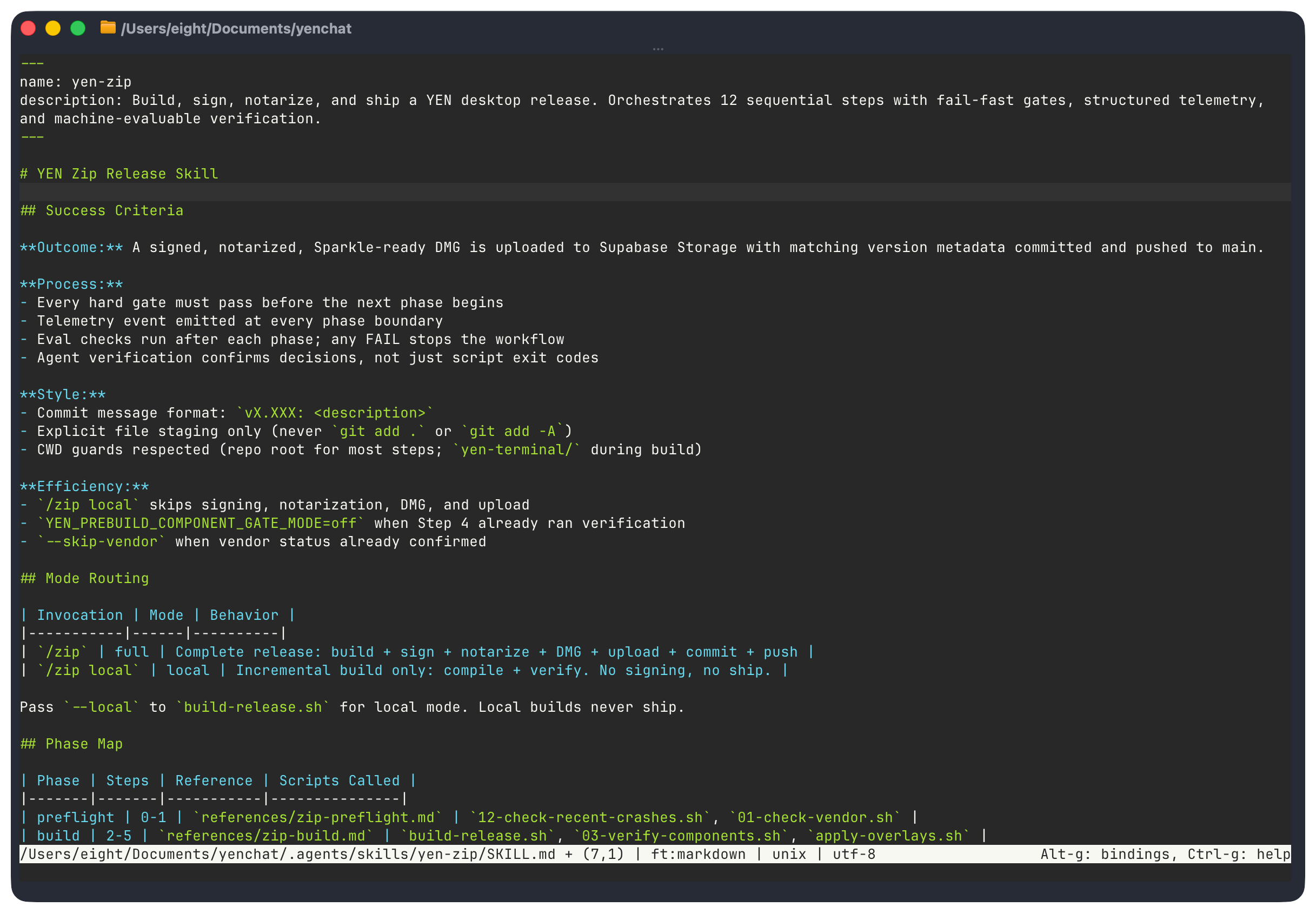
The agent never loads all references at once and my custom Phase Map table smartly routes the agent through each phase to a specific reference file so there’s no possibility of drift or contamination.
In other words, the agent reads only the reference it needs for the current phase, then moves on. I don’t constrain the model’s speed nor intelligence, I’m just telling it to not run off the road. The context window usage stays proportional to the current task, not the total skill complexity.
Just like the mama Codex always said.
Three-Layer Verification
To call it a “harness” feels weird at time because I don’t feel limited by the constraint; I feel empowered to move faster with greater confidence that every mistake is documented and then fixed and then proven via a successful compilation.
The verifications allow me to do this as part of the harness infrastructure. Another way of thinking about this is purely economical: It’s about conserving the model (and you) time by providing unambiguous guidance for repetitive, discrete, and predictable, deterministic outcomes.
But it’s on you. I have 3:
Script verification for build correctness with simple, existing bash scripts.
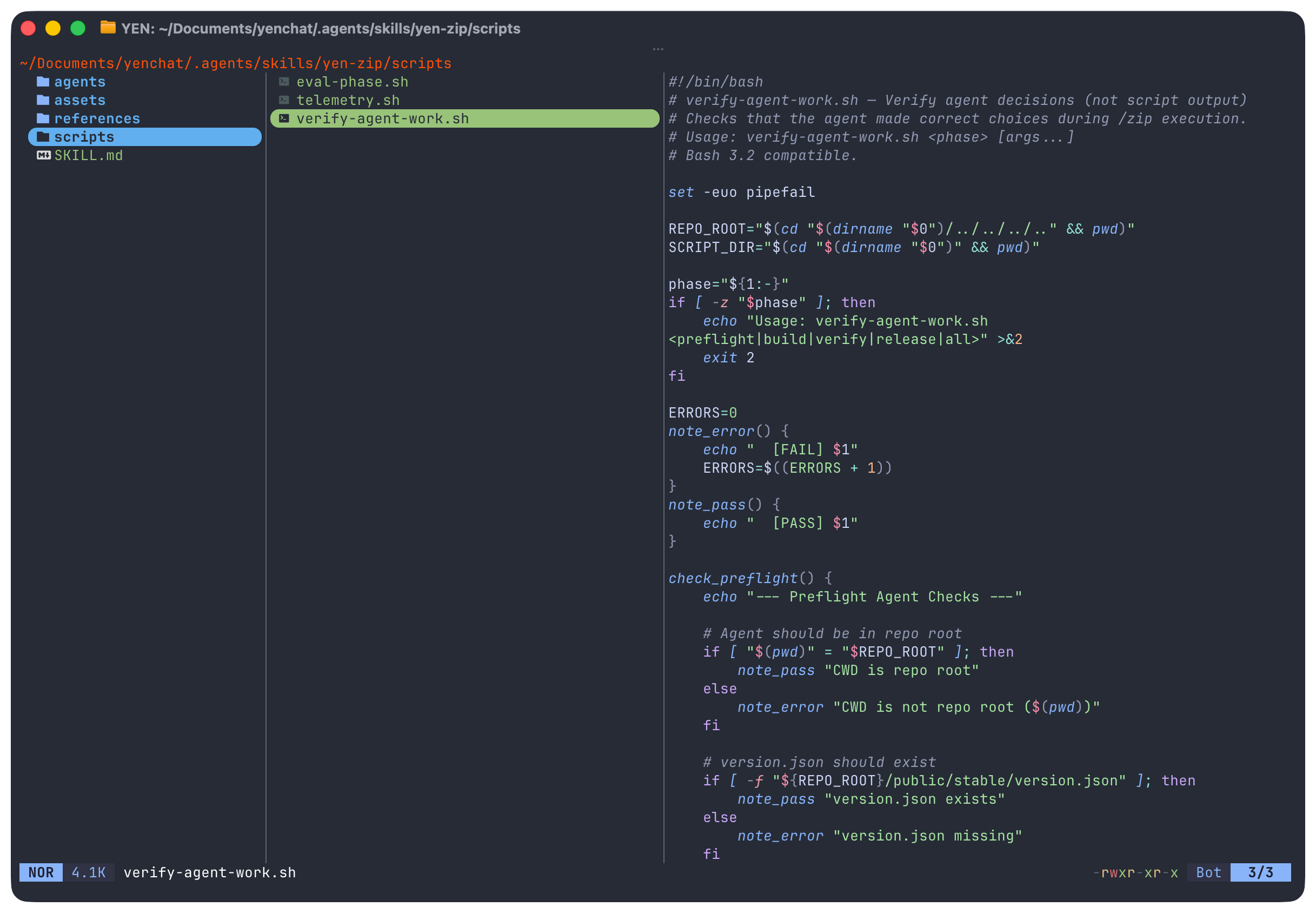
Agent verification for agentic decisions for things like CWD, version format, commit message, and branch using a single .sh script.
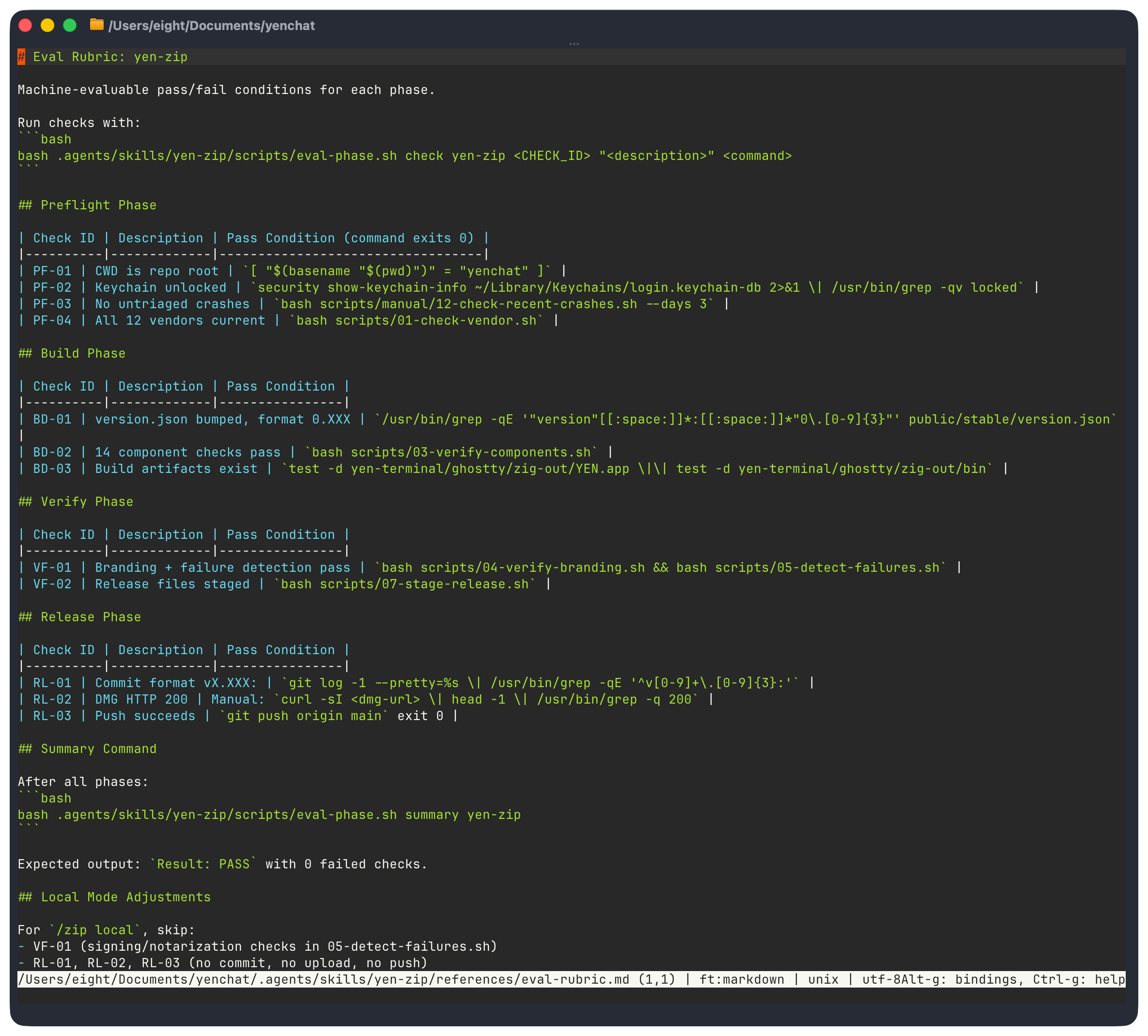
Eval verification for phase outcomes as machine-readable JSONL.
Why agent verification is separate from script verification is this: A script can exit 0 (correct build) while the agent made a wrong decision (wrong version format, wrong commit message, forgot to return to repo root).
Script verification validates the artifact. Agent verification validates the orchestration.
They’re orthogonal concerns. But we do them all for good measure.
Evals for Dummies: Telemetry as Append-Only JSONL
Evals aren’t that hard any more. I’ll show you.
So, I have 4 event types: phase_start, phase_end, gate, retry. JSONL — not JSON — because appending to an array requires reading + parsing + rewriting. JSONL is always a valid file after any echo >> append.
In my case, if the build crashes mid-phase, I still want all all prior events to be intact. I don’t want to waste any effort if I can.
No jq dependency for writing. Bash 3.2 compatible. Zero external dependencies. This telemetry answers:
Which phases take longest?
Which gates fail most?
How often do retries trigger?
These things make my current and future life easier because I have clear, time-stamped documentation on not just compiling time but now it’s relationship to the model’s actual speed through a prescribed task. I can see the correlation and I am aware of the causation to any changes in my core skill tree and the time it may take to run the full compile.
And I’m in complete control of those things. Of course, you can also poll for live reads on progress in the CLI if you’re building large systems because your ADHD doesn’t allow you to relax.
It’s a mad, mad world.
Tip: Use JSONL for build telemetry, not JSON.
It’s append-only, crash-resilient, and requires no parsing library to write. A crashed build at step 5 preserves telemetry from steps 1-4.
With JSON, a crash mid-write corrupts the entire file.
Boohiss.
7. Reproducible Patterns You Can Copy
Let me be specific about what you can take from this and apply immediately.
These are patterns, not YEN-specific implementation details and much of this comes directly from the source.
Pattern 1: The Skill File Structure
Every skill should follow this layout:
skill-name/
  SKILL.md                    # Orchestrator (what to do, in what order)
  agents/openai.yaml          # Interface config
  scripts/                    # Executable automation
  references/                 # Phase-specific detail (loaded on demand)
  assets/                     # Static resources (schemas, templates)
SKILL.md establishes the frame with clear boundaries, phase routing, success criteria. Scripts are self-contained with clear dependencies.
References are progressive disclosure and the agent loads them one at a time as needed. Assets are static resources that don’t change between invocations.
Pattern 2: Fail-Closed Gate Variables
Apply this pattern to any gate in your pipeline. The default is always “block.” Here’s how it literally looks in my codebase:
# Every gate defaults to enforce. Override requires explicit opt-in.
YEN_DMG_LAYOUT_GATE_MODE=”${YEN_DMG_LAYOUT_GATE_MODE:-enforce}”

if [ “$YEN_DMG_LAYOUT_GATE_MODE” = “enforce” ]; then
    # Gate logic here — failure blocks the pipeline
elif [ “$YEN_DMG_LAYOUT_GATE_MODE” = “report” ]; then
    # Same logic, but failure is a warning, not a blocker
fi
Emergency bypass requires setting an environment variable — which means it shows up in logs, is searchable, and creates accountability.
Pattern 3: Categorized Retry
Every retry point in the pipeline classifies errors.
is_retryable_error() {
    local output=”$1”
    # Transient: retry
    echo “$output” | grep -q “FileNotFound” && return 0
    echo “$output” | grep -q “connection reset” && return 0
    # Structural: don’t retry
    return 1
}
Retryable errors get retried with cleanup between attempts. Non-retryable errors fail immediately. The worst thing you can do is retry a real error — it wastes time and can mask the actual failure.
Pattern 4: Pre-Tool Hooks
#!/bin/bash
# guard-codesign-deep.sh — blocks codesign --deep
if echo “$TOOL_INPUT” | grep -q ‘\-\-deep’; then
    echo “BLOCKED: codesign --deep produces invalid nested signatures.”
    echo “Sign bottom-up: innermost binary first, outermost app last.”
    exit 1
Five lines. An intentional physical constraint. The agent will never successfully execute codesign --deep. This is stronger than any amount of “vibe coding”; it’s actual (harness) engineering.
It’s knowing what will rekt you and then programming it into the machine. Identify your catastrophic failure modes and make them effectively impossible.
Pattern 5: Source-Only Checks Before Compile
Never spend 10 minutes compiling code that will fail a 2-second check.
Step 4:  Component verification  →  reads SOURCE files only  →  seconds
Step 5:  Build                   →  compile + sign + package  →  10+ minutes
I initially had some verifications running post-build. Moving source-only checks to pre-build was one of the highest-leverage changes I made — it saves 10+ minutes on every caught issue.
Pattern 6: Append-Only JSONL Telemetry
emit_telemetry() {
    local event=”$1” phase=”$2” metadata=”$3”
    local ts
    ts=”$(date -u +%Y-%m-%dT%H:%M:%SZ)”
    echo “{\”ts\”:\”${ts}\”,\”skill\”:\”${SKILL_NAME}\”,\”event\”:\”${event}\”,\”phase\”:\”${phase}\”${metadata:+,${metadata}}}” \
        >> “${TELEMETRY_DIR}/${SKILL_NAME}-$(date +%Y-%m-%d).jsonl”
}
No dependencies. Crash-resilient. Bash 3.2 compatible.
Drop this into any pipeline and start collecting data about where time is spent.
Pattern 7: Success Criteria as a Contract
Define what success looks like before writing the skill.
## Success Criteria
- Outcome: Signed, notarized, uploaded DMG; appcast updated; git pushed
- Process: All 12 steps completed sequentially; no step skipped
- Style: Zero manual intervention; all verification gates passed in enforce mode
- Efficiency: Full build completes in under 20 minutes
The criteria that you want will span these four dimensions:
Outcome: What was produced.
Process: How it was produced.
Style: How clean was the execution?
Efficiency: How long did it take?
This turns “did it work?” from a subjective judgment into a measurable contract.
8. In Conclusion
The patterns described in this post are not YEN-specific. They’re design principles that you can use for your own projects and skill library:
Enforcement beats instruction. If a rule is important, don’t just write it in the skill — enforce it at the tool level. Hooks beat just vibin’ it every single time.
Match constraint depth to fragility. A lint check needs one gate. Code signing may need 10 times that. Over-constraining simple tasks wastes tokens. Under-constraining fragile tasks ships bugs. Calibrate.
The repo is the single source of truth. If the agent can’t see it in context, it doesn’t exist. Put your golden principles in the repo, not in documentation systems the agent can’t reach. This seems obvious to some but not to a lot of folks still.
Fail closed by default. Every gate should default to “block.” Emergency overrides should require explicit opt-in, be logged, and create accountability.
Source checks before compile. Never spend 10 minutes building something that will fail a 2-second source check.
Categorize your retries. Retrying transient errors is resilience. Retrying structural errors is waste.
Design for crash recovery. Your locking, your telemetry, your state management — all of it should survive a crash at any point in the pipeline.
Triple verify the things that matter most. Pre-build, during-build, post-build. Each layer catches things the others miss.
The age of AI-orchestrated build systems is here. I’m living it every single day.
And I can never go back.
The question isn’t whether to use AI agents with a harness in your pipeline — it’s whether your harness is good enough to actually constrain them to maximize output.
Build the harness first. Make the catastrophic failures impossible. Then let the agent do what agents do best: Read output, make decisions, handle the unexpected, and move fast through a well-defined protocol.
I ship a 30-language desktop app from a single command. The pipeline has never shipped a bad release. And I sleep well at night — not because the AI is perfect, but because the harness makes what we’re doing together safe.
And may you have sweet, sweet agentic dreams.
— 8
Great write up, I have converged on much of this as well but you've definitely got ne thinking as well.
This part:
"The agent never loads all references at once and my custom Phase Map table smartly routes the agent through each phase to a specific reference file so there’s no possibility of drift or contamination."
And in other places, it seems you're implying that you're dynamically modifying artifacts to manage context?
Also, do you have a non-substack source for your articles so that I might parse this one?