


Hey folks!
I’ve shipped three things into YEN over the last stretch that look unrelated on the surface — an agent evidence trail, a real port inspector, and full macOS scriptability. They are not unrelated. They are the same argument made three times.
The argument is this: A terminal-first IDE is not a text editor with a terminal panel attached. It is the inverse. Start from the terminal and add the IDE capabilities that make the terminal safer, more contextual, and more trustworthy. Each of these three pieces is what that thesis actually looks like in code.
Here is what shipped, and why each one matters.
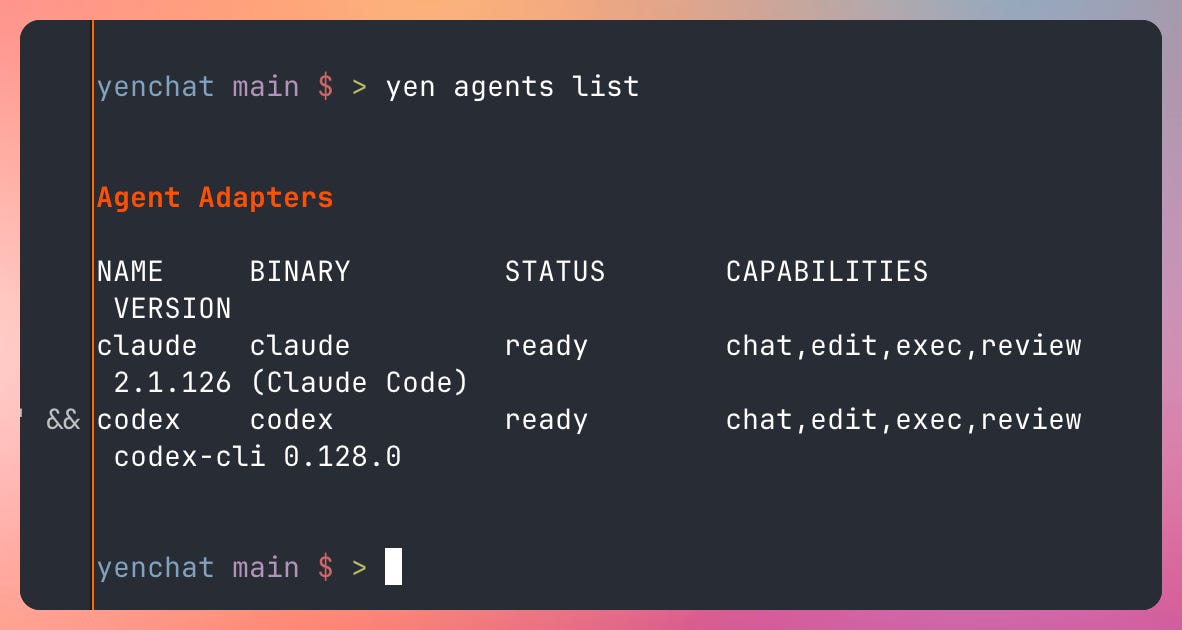
If an agent touches your repo then your terminal should have receipts.
The current AI coding market has a trust problem that gets ignored because the demos look productive. A tool opens an agent session, edits files, runs a few commands, and then leaves behind something that feels more like vibes than evidence. You are expected to merge based on the fact that an agent looked busy.
That is not good enough.
YEN now ships yen agents list, yen agents open, yen agents timeline, yen agents note, yen agents export, and yen agents templates as a bounded local-first surface around first-party adapter profiles like claude and codex.
yen agents open launches a session without pretending the adapter is more reliable than it is. If the binary is missing, the flow stays fail-open and drops to a normal shell. But when launch metadata is available, YEN records it: binary path, probe command, probe result, version, launch mode, fallback state, workspace identity, slot, branch, and dirty-state context. “The agent ran” is not one fact. There is a huge difference between “Claude launched normally in the expected workspace” and “the adapter was missing so the session really fell back to a shell.”
yen agents timeline is the readable history surface for that state. Workspace-scoped, source-tagged, filterable. Session events show as agent:<slot>. Human notes are human. Supervisor-style notes are **supervisor**. Internal events are system. Output renders as text or JSON, with stable schema metadata so downstream consumers don’t reverse-engineer a second unofficial contract.
The important part is not the filter set. The important part is that the timeline doesn’t stop at “agent opened” and “agent closed.” It also carries the latest linked IDE evidence that already exists elsewhere in YEN — local verify and test results, quality and workflow reports, merge-readiness snapshots, PR-review evidence, current-branch CI state, and the local build-watch snapshot — through one shared evidence model.
Status is explicit. The timeline and export surfaces share an evidenceStatus vocabulary: missing-report when the artifact does not exist, stale-report when it exists but is too old to trust, unverified when no meaningful proof exists yet, and exported-with-gaps when I can still produce a bundle but the bundle itself tells you what is missing instead of pretending completeness.
yen agents note is the missing human layer. Notes support lightweight templates for review approval, review rejection, handoff for review, and handoff for merge. They can validate that a note is actually bound to the right session or slot, so a human approval becomes a recorded part of the handoff instead of a sentence someone remembers writing in Slack ten minutes earlier.
yen agents export turns the local session history into a handoff bundle in Markdown or JSON: timeline, approvals, handoffs, workspace-keyed repo context, risk summary, adapter metadata, explicit evidence gaps, linked IDE evidence references. It does not invent a second review namespace — it reuses the same truth YEN already uses for verification, workflow, merge-readiness, and PR review.
The whole surface stays local-first. Artifacts are local. Timeline is local. Notes are local. Export is local. Archive is opt-in. Retention is short by default at 7 days. Redaction happens before saved artifacts are written. And if the capture path breaks, YEN fails open and preserves the terminal session rather than pretending the evidence story is stronger than it is.
That is what I mean by receipts.
Your terminal should know what’s running on every port.
You are running Next.js on port 3000. Django on 8000. Postgres in Docker on 5432. Then something mysterious claims port 5000 and you have no idea what it is.
The usual answer is some combination of lsof, ps, and docker ps run separately, parsed manually, and forgotten immediately. Maybe you install a third-party tool that needs Node 18+ just to show you a table.
YEN already had yen ide ports as a basic lsof dump. Now it is a full port inspection surface:
bash
yen ide ports              # Dev ports with framework detection
yen ide ports --all        # Everything, including system services
yen ide ports 3000         # Deep dive on one port + optional kill
yen ide ports ps           # All dev processes with CPU / memory
yen ide ports clean        # Find and kill orphaned / zombie processes
yen ide ports watch        # Live monitor, 2-second polling
Every subcommand supports --json for scripting and --yes to skip confirmation prompts. The default view is dev-focused — system services like ControlCenter and rapportd get filtered out unless you pass --all.
Framework detection runs in three tiers. First, process name and command-line pattern matching — python3 manage.py runserver is Django, bun run next dev is Next.js running on Bun. Twenty-plus frameworks covered: Next.js, Vite, Django, Flask, Uvicorn, Gunicorn, Rails, Spring, Supabase, Turso, Caddy, Traefik, Zig, Rust, Go, PHP, Deno, Bun, Node, Java, Ruby. Second, working-directory inspection — resolve each process’s cwd via lsof, walk up to find the project root by looking for package.json, go.mod, Cargo.toml, or pyproject.toml, then check for framework config files. Third, Docker container mapping — cross-reference docker ps to pull container names so Postgres, Redis, and nginx get named correctly instead of showing up as a mysterious docker-proxy process.
The result actually tells you what is going on:
COMMAND     PID      PORT     FRAMEWORK   UPTIME   CONTAINER   BIND
node        41023    3000     Next.js     2h 14m   —           *:3000
python3     41156    8000     Django      1h 03m   —           127.0.0.1:8000
docker-pr   41289    5432     PostgreSQL  4h 31m   myapp-db    *:5432
bun         41302    3100     Vite        22m 08s  —           *:3100
yen ide ports 3000 shows everything about the process on that port — PID, user, CPU, memory, working directory, project root, git branch — then asks if you want to kill it. SIGTERM first, not SIGKILL, with a 2-second wait. Every kill gets logged to YEN’s IDE timeline because a terminal-first IDE should keep receipts on destructive actions.
yen ide ports clean finds two kinds of problems: orphaned dev servers whose parent died and got reparented to PID 1, intersected with a dev-process allowlist so we don’t flag system daemons like httpd or cupsd as false positives; and zombie processes still holding a port. Both get listed with reasons, and you can batch-kill them with one confirmation prompt.
yen ide ports watch polls every 2 seconds and reports opened and closed ports with timestamps, with trap cleanup on Ctrl + C, SIGTERM, or SIGHUP so the temp file doesn’t leak.
About 1,300 lines of bash and Python, 8 regression tests, no new dependencies — just lsof, ps, and docker stitched together into one terminal-native view.
Your terminal should be scriptable.
Most terminals are black boxes. You launch them. Maybe you pass a command. That’s it.
The problem is that developers have workflows — not commands. “Open this project” means: navigate to the repo, split the window, start the test runner on the right, start the dev server on the left. Doing that manually every time is fine once. It’s friction at scale.
The standard answer in the macOS world is AppleScript. Terminals have historically been bad at it because they are fundamentally interactive processes — you can open a window, but can you address a specific surface? Can you tell a pane what to run?
YEN has a solution for this now. It ships a branded .sdef. Open Script Editor, find YEN.app in the Library, and browse the dictionary. The current surface is deliberate and minimal:
- new window — opens a terminal window
- new tab — opens a tab in the frontmost window
- split — splits the active surface
- surface configuration — lets you configure an individual surface
- Terminal objects have `pid` and `tty` properties
YEN-native features — layout presets, scratchpad, tab sidebar, the PR review workspace — are not exposed through AppleScript `perform action`. The `Cmd + Option + 1-0` layout presets are intentionally not cloned into a second layout source of truth. Compose three-column layouts with `new tab` + `split` calls rather than replicating preset logic externally.
The App Intents surface shares the same canonical action-string catalog as AppleScript, so Shortcuts.app, Focus Filters, and Siri Shortcuts compose with the same YEN actions.
Why these three belong together.
Each of these surfaces is a different cut at the same idea.
Agent receipts say: If a session changed the repo, the terminal should be able to answer “what exactly happened?” without asking you to trust a second system. The receipts stay close to the repo, the terminal, and the review flow you are already in.
Port inspection says: if a process is running, the terminal should be able to tell you what it is, where it lives, and let you kill it safely. With logging. Because a terminal-first IDE should keep receipts on destructive actions, even small ones.
Scriptability says: if your workflow has shape — open the project, split the panes, start the test runner — the terminal should let you encode that shape. Not as a brittle command sequence, but as something macOS Automation can address by surface, by `pid`, by `tty`.
In each case, the question is the same. Should this thing live in a separate hosted dashboard, a third-party CLI, or a JavaScript wrapper? Or should it live in the terminal you are already in?
I keep landing on the second answer. The terminal is where commands actually run, where repo state is visible, where output becomes real, where agents either prove their work or don’t. If that is true, then trust, observability, and scriptability belong there too — not bolted on, not in a browser tab, not behind a hosted account.
That is the bet. Not bigger spectacle. Better receipts.
— 8